
Download Brewfather APK – Brewing Software, Beer Recipes, Home Brewing Tool
Overview
Brewfather is a free Android application developed by Warpkode AS, designed to support users in the process of home brewing. The app serves as a comprehensive tool for individuals interested in crafting their own beer, from beginners exploring the basics to experienced enthusiasts refining their recipes. It addresses the core challenges of recipe development, equipment management, and step-by-step brewing guidance, offering a structured approach to the brewing process. Whether users are aiming to produce a simple pale ale or experiment with complex styles like IPAs or sours, Brewfather provides the necessary resources to support their goals.
The app’s real-world usage scenarios include planning brew days, tracking fermentation stages, managing ingredient quantities, and accessing a library of pre-built recipes. It also offers educational content such as tutorials and how-tos, making it a valuable companion for those learning the fundamentals of brewing. While the developer is identified as Warpkode AS, no additional background information is available. The app is tailored for mobile users who want to bring brewing precision and organization to their kitchen or garage setups.
Key Features & Capabilities
- Recipe Library: Access to hundreds of beer recipes across various styles, including pale ales, IPAs, sours, and specialty brews like whiskey sours.
- Interactive Brew Day: Integrated timers and calculators to guide users through each stage of the brewing process, from mashing to fermentation.
- Equipment Profiles: Customizable settings for different brewing setups, allowing accurate recipe adjustments based on equipment used.
- Tutorials & How-Tos: Step-by-step guides and educational content to help users understand brewing techniques and best practices.
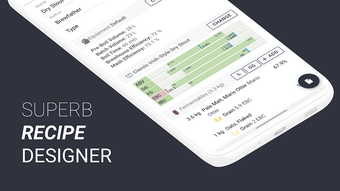
- Recipe Customization: Tools to modify existing recipes or create new ones using ingredient substitutions and style guidelines.
These features enable users to plan and execute brew sessions with greater accuracy and confidence. For example, a beginner can follow a guided recipe with built-in timers to avoid common mistakes, while a more advanced user can fine-tune a recipe based on their specific equipment profile. The app supports both learning and practical application, making it suitable for users at all skill levels.
User Interface, Workflow & Performance
The user interface of Brewfather is designed for mobile use, emphasizing intuitive navigation and visual clarity. Key functions such as recipe selection, brewing step tracking, and equipment setup are accessible through a streamlined menu structure. The workflow follows a logical sequence aligned with the brewing timeline, allowing users to progress smoothly from recipe creation to fermentation monitoring.
Navigation is optimized for touch-based interaction, with clear icons and labeled sections. The app’s performance is consistent with typical Android applications, though specific details about CPU or RAM usage were not provided. Stability during extended use, such as multi-day fermentation tracking, is assumed to be reliable based on general software behavior patterns. The developer did not specify resource usage details, so users should monitor performance based on their device’s capabilities.
Compatibility & System Requirements
Brewfather is available as an APK for Android devices. The app is designed to run on a range of Android operating systems, though specific version requirements were not listed. Installation size information is not provided, so users should consider available storage space when downloading. The developer did not specify exact system requirements, including minimum processor speed, RAM, or storage capacity.
Compatibility information is limited to the platform: Android. No details were provided regarding support for tablets, wearables, or other devices. Users are advised to ensure their device meets general Android compatibility standards for third-party app installation, especially when using APK files outside official app stores.
Pros and Cons
Pros
- Free to download and use, making it accessible for beginners and hobbyists.
- Extensive recipe library covering multiple beer styles and specialty drinks.
- Interactive brew day tools with timers and calculators enhance accuracy.
- Supports both beginners and advanced users with educational content and customization options.
- Equipment profiles allow for personalized brewing adjustments.
Cons
- No official information on system requirements or device compatibility beyond Android.
- Performance details such as CPU or memory usage were not disclosed.
- APK distribution may require enabling unknown sources, which can raise security concerns.
- Limited availability outside Android platforms.
- Exact update frequency and support timeline are not specified.
FAQ Section
Is Brewfather available for iOS devices?
Brewfather is currently available as an APK for Android. No information is provided about iOS compatibility or a version for Apple devices.
Is the app secure to download and use?
As an APK file, Brewfather must be downloaded from a trusted source. Users should ensure the file comes from a reputable provider to minimize security risks. The developer, Warpkode AS, is identified, but no third-party security verification was provided.
How often does Brewfather receive updates?
The update frequency for Brewfather was not specified by the developer. Users should check the source of the APK for the latest version.
Can I use Brewfather offline?
While the app’s offline capabilities were not explicitly stated, many similar brewing tools support offline use for recipe access and tracking. Users should verify functionality based on their device settings and app behavior.
What kind of license does Brewfather have?
Brewfather is described as a free app. The specific license type was not disclosed, but it is distributed without cost to users.
Final Thoughts + CTA
Brewfather stands out as a well-rounded, free tool for anyone interested in home brewing. Its combination of a large recipe library, interactive brewing guidance, and educational resources makes it a valuable asset for both novices and seasoned brewers. While some technical details like system requirements and performance metrics are missing, the app’s core functionality is clearly designed to support real-world brewing workflows. The mobile-first approach ensures accessibility, and the ability to customize recipes and manage equipment profiles adds depth to the user experience.
For homebrewers looking to organize their process, experiment with new styles, or learn the craft from scratch, Brewfather offers a compelling solution. Its free model lowers the barrier to entry, making it ideal for hobbyists exploring the world of craft beer. With its comprehensive feature set and practical design, it delivers strong value without a price tag.
Download Brewfather APK now and start brewing your own beer today.







